LifelockLifeLock Customer Service: Phone Numbers, Cancellation Steps and What to Confirm First
LifeLock Customer Service: Phone Numbers, Cancellation Steps and What to Confirm First
The short answer
LifeLock's main customer line is 1-800-543-3562, with an international line at 1-480-457-4500 and an online support site for account and billing questions. Support is reached through the phone menu, and holds vary. To cancel without surprises, confirm the renewal price and what the cancellation turns off, then cancel in writing and keep the confirmation. Check any number against the official site before you share personal details.
Some links on this site are affiliate links: if you buy through one, the site may earn a commission at no extra cost to you. More about this.
If you have tried to get a straight answer from LifeLock, you know how hard that can be. You dial about a charge or a cancellation and end up listening to menus, waiting on hold, and being offered an upgrade before anyone answers your question. That frustration is common, and it is not your fault.
This page is for you if you are weighing whether LifeLock is worth paying for, or if you already have an account and want to leave it without losing protection you did not mean to give up. You should come away knowing how to reach support, what to ask before you pay, and what to get in writing when you cancel.
We will cover the phone and online routes, what buyers commonly report about support, and the points to confirm first, including renewal pricing and what switches off when your plan ends. The picks and advice here come from the owner's own review of this product category, and from hands-on reviews by other people that we credit by name where we use them.
LifeLock Customer Service Phone Numbers and Contact Routes
When you need to talk to someone at LifeLock, the first step is finding the right number. LifeLock lists its main contact details on its own contact page, so start there. Contact details that appear in search results or on third-party sites are not always up to date, and some do not belong to LifeLock at all.
Here are the numbers listed on LifeLock's contact page:
- Toll-free line: 1-800-543-3562
- International line: 1-480-457-4500
- Support site line: 1-800-416-0599, for account, billing and breach-alert questions
Call the support line if your question is about your account, a charge, or an alert you received. Have your account details ready so the call goes faster.
What are my other options besides calling?
You can also write to LifeLock. The company lists a mailing address in Tempe, Arizona, and an online email route through its website. Mail moves slowly, so use it for anything you want on paper. Check the official page for current details before you send anything, since addresses and forms can change.
How do I tell a genuine LifeLock line?
Third-party sites often list different contact details, sometimes ones that connect to upsell lines or lookup services. Treat any line you did not get from LifeLock's own contact page with caution. If a line is not on the official page, do not share your Social Security number or card details on that call.
Phone lines LifeLock lists
| Line | Number | Use it for |
|---|---|---|
| Toll-free line | 1-800-543-3562 | Main customer line |
| International line | 1-480-457-4500 | Calls from outside the US |
| Support site line | 1-800-416-0599 | Account, billing and breach-alert questions |
How to Reach a Live Person and What to Expect on the Call
Getting a human on the line with LifeLock is often the first real test of the service. The phone menu is built to sort callers by reason, so the trick is picking the right options and not hanging up in frustration.
Start by dialing the number listed on the official LifeLock website, not one from a search ad or a third-party page. Scammers buy those ads, and that is exactly the kind of contact you are trying to avoid.
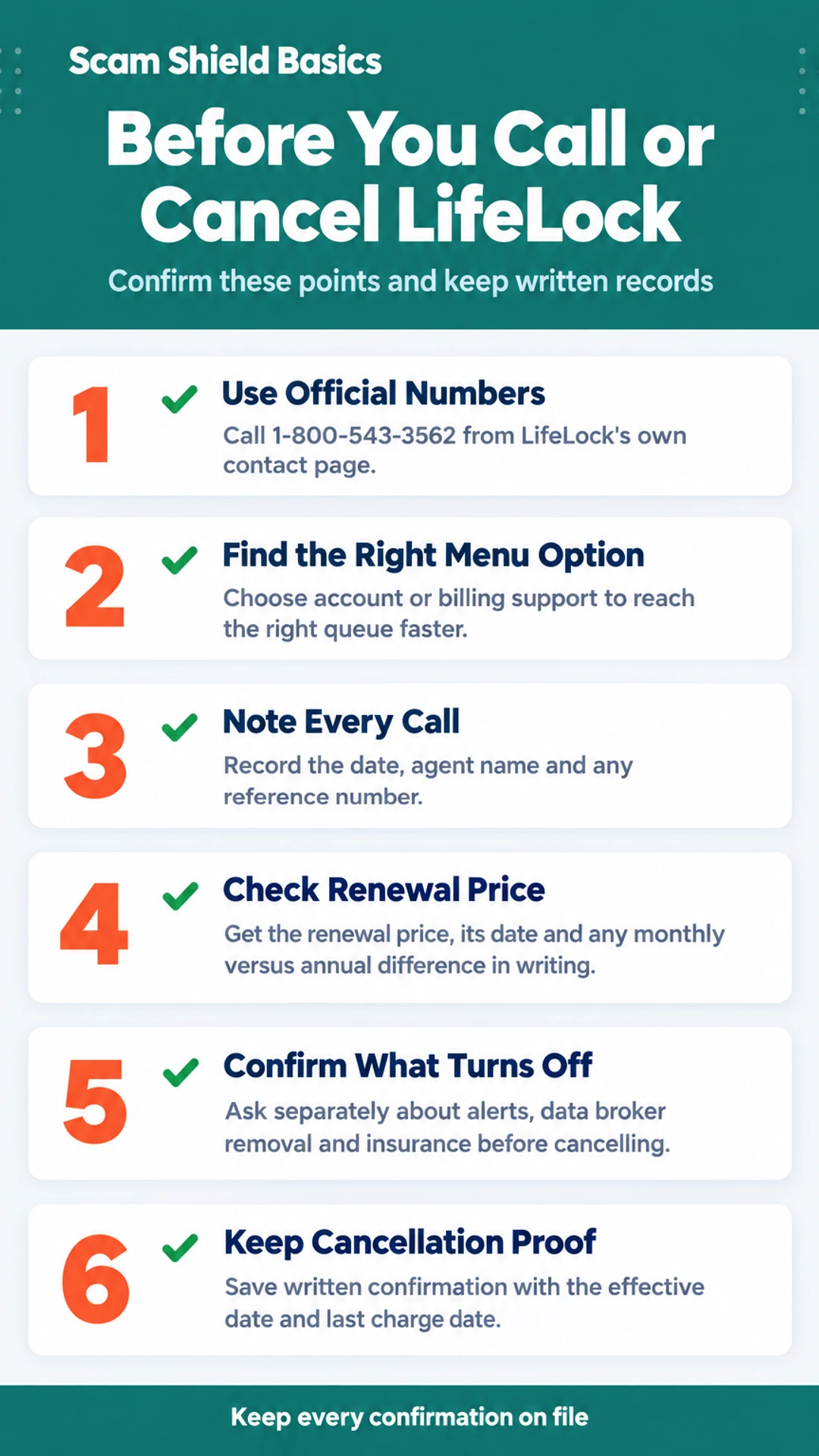
Once you are in the phone tree, these steps usually help you reach an agent faster:
- Say or press the option for a new account or existing customer, depending on your situation.
- If the menu asks for a reason, choose account or billing support rather than a general product question, since that queue is often staffed for account changes.
- If you are stuck, try saying "representative" or pressing zero. Many systems offer that shortcut even when the menu does not mention it.
Hold times vary a lot by time of day and by the reason for the call. Early mornings on weekdays are usually quieter than lunchtime or the end of the month. I have not timed these calls myself, so treat that as general experience rather than a measured fact.
Hours are not something to assume. Check the official page for current hours, since they can change, and confirm before you plan a call around a deadline.
Be ready for the representative to ask:
- The email address on the account
- The name on the plan
- The last four digits of the card on file
- Why you are calling
Keep a short note for every call. Write down the date, the agent's name, and any reference number. If the call goes badly, that note is what you will need to follow up.
What Buyers Report About Support Quality
When people write up their experiences with LifeLock support, the same few points keep coming up. Two YouTube reviewers called the company directly, and their results were not identical.
In The Opt Out Project's review, the tester reached someone right away and the rep was responsive. But the call did not stay on the problem. The rep pitched an upgrade during the conversation. That is worth knowing before you dial, because you may spend part of the call listening to a sales pitch.
In The Tech Roost's review, the reviewer made a signup call about a hypothetical problem. The representative would not let them hang up before pitching a coverage upgrade. The same reviewer, on a different service's line, found the support friendlier and had no upsell at all. That comparison is useful, but it is one reviewer's experience on one day.
Reviewers' experiences differ, so you should decide for yourself. A quick call tells you little about the product itself. Use the checks in the later sections to judge the coverage.
Here is what we suggest:
- Ask direct coverage questions, such as which credit bureaus are monitored and what the insurance covers.
- Get the answer in writing, through email, chat transcript, or the plan terms, rather than relying on what you heard on a call.
- Note the name of the rep and the date. Keep the phone number you used.
- If the conversation turns into a sales pitch, ask for the written terms and end the call.
What reviewers reported on support calls
| Review | Reported experience | Reported drawback |
|---|---|---|
| The Opt Out Project | Reached someone right away; rep was responsive | Rep pitched an upgrade during the call |
| The Tech Roost | Rep pitched a coverage upgrade before hang-up was allowed | Support on a different service's line was friendlier with no upsell |
How to Cancel LifeLock Without Surprises
Start by finding the cancellation route. You can usually do this in your account settings online or in the app. If you cannot find it, contact LifeLock customer support and ask them to cancel for you. Either way, save the confirmation. A screenshot or emailed receipt is your proof if a charge shows up later.
Before you cancel, know what turns off. According to the Finance Pulse reviewer, cancelling switches off LifeLock's credit lock. A legal freeze you placed yourself with the bureaus stays in place, because that is handled outside the subscription. Keep that in mind if you want protection to continue after you leave.
Check whether everything ends on the same day. Ask about these separately:
- Account alerts
- Data broker removal
- Insurance coverage
Do not assume they all stop at the same moment. Ask the representative or read the terms to see when each one ends.
Confirm the date of the last charge. Ask whether you will be billed again after cancellation and how much any final charge will be. Write the date down.
Last, request written confirmation of the cancellation. An email or letter that states the effective date is the best record you can keep. If the call ends without one, reach out to support again and ask for it.
What to Confirm in Writing Before You Pay
Before you enter a card number, get the key terms in writing. Sales pages and chat agents can leave out the details that matter most later.
What will I pay when it renews? The first-year offer is rarely what you pay long term. Ask for the renewal price, the exact date it applies, and whether it changes after that. Check the monthly versus annual rate too, since they often differ. Write down the figure and the date.
Which credit bureaus does my plan actually watch? Not every tier covers all three bureaus, Equifax, Experian and TransUnion. The Opt Out Project reviewer says LifeLock Core monitors two of the three, and three-bureau monitoring requires a higher tier. Ask which bureaus your specific plan covers, and confirm it in writing.
Is there insurance or reimbursement, and what are the conditions? If a plan advertises a reimbursement amount, ask what it covers, what it excludes, and what you must do to qualify. Find the policy terms, not only the marketing page. Keep a copy.
How are refunds and cancellations handled after the first billing cycle? Ask how to cancel, whether you can get a prorated refund, and what happens to any locks or freezes when you leave. In one reviewer's testing, cancelling switched off the credit lock while a legal freeze stayed in place. Know which one applies to you.
If the answer is vague or only given verbally, ask for it by email or chat so you have a record.
Protecting Yourself When You Call and Keeping Records
Calls about identity protection are a common target for scammers, so it helps to set some ground rules before you pick up the phone.
Who you share information with matters. A real customer service rep may ask you to confirm your account details, but you should not give your full Social Security number or any password to someone who contacted you first. If you started the conversation yourself and you have verified the number, you can decide what to share. Even then, share only what the rep needs.
Check the number first. Look up the phone number on the official LifeLock website and compare it with the number that called you or appears in an email. Be wary of any unsolicited call, text or email that asks for payment, gift cards or a fee to "fix" a problem. Hang up and call the verified number instead.
Keep one running log. Write down the date and time of each call, the agent's name, the reference or case number, and a short note on what was promised. Keep it in one place, such as a single document or notebook. If the issue drags on, this record is what makes your case easy to follow.
Escalate in writing when a call goes badly. If you are stuck or the rep is not helping, ask for an escalation contact. LifeLock's published escalation address has been executiveescalations@lifelock.com. Put your complaint in an email, include your reference numbers, and keep a copy. A written trail is much harder to lose than a phone conversation.
What hands-on reviewers found
These are other people's hands-on tests, summarised and credited to them. Watch the full videos for their complete reviews.
Finance Pulse: LifeLock Tutorial 2026: Full Setup Walkthrough & Honest Review 🛡️
The reviewer thinks LifeLock is worth paying for mainly for its automated data broker removal and alerts, while noting it has real gaps: the credit lock covers only TransUnion, Core lacks scam coverage, and cancelling does not lift the lock
- The whole LifeLock setup took about 20 minutes, covering plan selection, signup, credit locking, alerts and monitoring. (at 0:18)
- Connecting a bank account through Plaid took about 30 seconds per account, and the reviewer says it needs no further attention afterward. (at 1:36)
- The reviewer says the credit lock and payday loan lock can be toggled from a phone, which matters when someone is at a car dealership. (at 2:45)
The Tech Roost: Lifelock Review - Here’s Who It’s Actually For
The reviewer thinks LifeLock is a legitimate product but suited only to a specific buyer who wants the Norton name, antivirus and VPN and will pay more for them, and considers Aura the better fit for most people.
- Compared to the rest of the category, LifeLock has real strengths: brand recognition, a strong VPN, and antivirus from the Norton ecosystem that does not slow the computer down. (at 0:34)
- In side-by-side testing that simulated a credit check or major purchase, LifeLock consistently came in last on alert speed, with the reviewer citing 2 to 3 minute alerts for modest services. (at 2:59)
- During the reviewer's first on-camera LifeLock signup call about a hypothetical problem, the representative would not let them hang up before pitching a coverage upgrade. (at 4:20)
Frequently asked questions
What is the LifeLock customer service phone number?
LifeLock customer service can be reached at the phone number listed on the official LifeLock website, usually under the help or contact section. Numbers on random third-party sites can be outdated or fake, so check any number against the company's own pages before you dial. Have your account email and plan name ready.
How do I cancel LifeLock without getting upsold?
Cancellation usually starts in your account settings or with a support representative. Expect a retention offer or upgrade pitch, and say clearly that you want to cancel. Ask for written confirmation of the cancellation date, any refund owed, and whether your credit lock or freezes will switch off.
What should I confirm before I pay for LifeLock?
Confirm the exact price after the first year, what each tier covers, and whether all three credit bureaus are monitored. Ask what happens to your credit lock and alerts if you cancel. Get the answers in writing, such as in an email or chat transcript, and keep them.
Does LifeLock customer service help with identity theft recovery?
Support can explain the recovery steps and what the plan includes, but the paperwork with banks and credit bureaus depends on the plan tier. Ask the representative exactly which recovery help is included and whether a named case handler is assigned. Save the case number from every call.
Can I freeze my credit myself instead of paying LifeLock?
Yes. Credit freezes and fraud alerts are free and placed directly with Equifax, Experian and TransUnion. A paid service mainly adds monitoring, alerts and some recovery help on top. Compare what each option does before deciding, since free freezes already block new accounts in your name.
Wrapping up
Reaching LifeLock is easy. Getting a straight answer about price, cancellation and what your plan really covers takes a bit more work.
Before you pay, get the details in writing, including what happens to your credit lock if you cancel. Have you had a support experience that went well or badly? Share it in the comments.