LifelockSecurity Freezes, Fraud Alerts and Free Credit Reports: What Each One Covers
Security Freezes, Fraud Alerts and Free Credit Reports: What Each One Covers
The short answer
A credit freeze blocks lenders from opening new accounts in your name, and it is free at Equifax, Experian and TransUnion. You must place one at each bureau. A fraud alert asks creditors to verify your identity before opening credit, and it lasts one year. Free credit reports are available from each bureau. Freezes do not affect your credit score, but they do not stop fraud on existing accounts.
Some links on this site are affiliate links: if you buy through one, the site may earn a commission at no extra cost to you. More about this.
- Who each tool is for: how a freeze, a fraud alert and a free report differ, and when each one makes sense.
- What they cannot do: why none of them watches your existing cards, or the dark web, for misuse.
- Where a paid plan has to win: the baseline free protections a paid service must beat to justify its cost.
- What the reviewers found: what independent testers said about the credit locks and alerts that paid products offer.
- How to set up the free basics: the steps to place freezes and pull reports yourself, without paying anyone.
If you have just gotten a data breach notice, or a stranger tried to open something in your name, you probably want to do something today, and you may be wondering whether a monthly fee is the only real answer. Often it is not. Most of the protection people pay for starts with tools you can set up yourself for free.
That is the good news. Once you know what a freeze and a fraud alert actually do, you can lock down your credit in under an hour and see clearly what a paid plan adds on top. Scam Shield Basics put this page together to show you that baseline first.
I will be honest about how the comparisons here were chosen. They come from what the free tools cover, what the reviewers below reported, and what the bureaus publish, not from a test I ran myself.
What Free Credit Freezes Cover
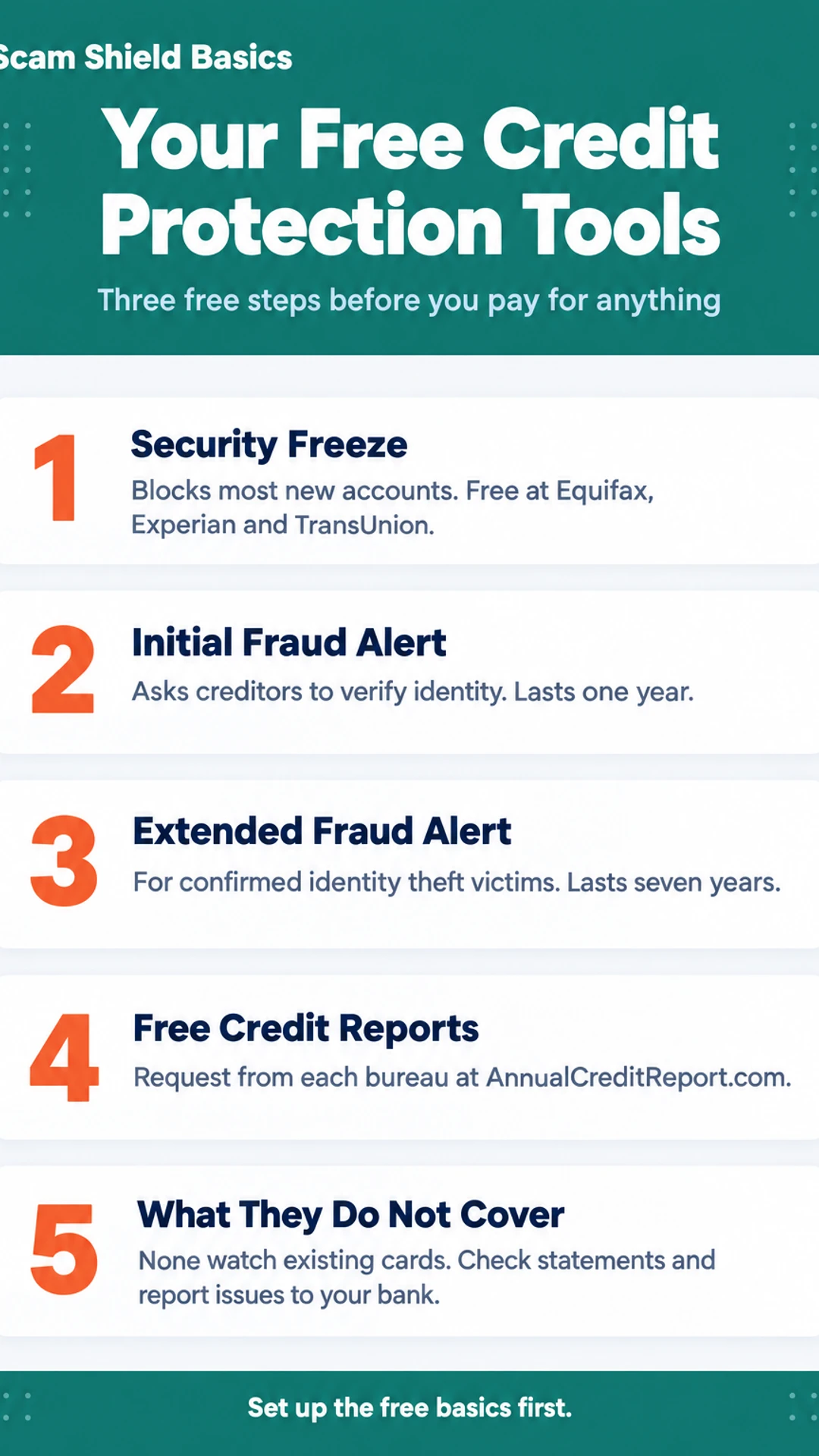
A security freeze is one of the most useful free tools you can put on your credit. It works by locking your credit file at the three nationwide bureaus, Equifax, Experian and TransUnion, so most new creditors cannot pull your report to approve a loan, card or account. If someone tries to open credit in your name, the lender usually cannot see enough to say yes.
A freeze does not block everything, though. Here is what it leaves open:
- Existing creditors can still see your report and manage the accounts you already have.
- Collection agencies working on debts you already owe can still access your file.
- Some agencies and employers that have a legal reason to check your report can still do so.
- Your own report is still available to you at any time. You can lift the freeze temporarily or permanently when you need credit.
Will a freeze stop fraud on my existing accounts?
No. A freeze only guards against new accounts. If someone steals your card number or takes over an account you already have, the freeze does nothing to stop those charges. You still need to check statements, watch for unfamiliar transactions and report problems to your card issuer or bank quickly. Many issuers give you alerts and the ability to lock a card, and that is the place to deal with card fraud.
Placing a freeze is free, and you can do it yourself by contacting each bureau directly. You do not need a paid plan to learn how to create one or to keep your name and number protected. Experian, Equifax and TransUnion each have their own online process for this.
How to Place a Freeze at All Three Bureaus
A security freeze blocks lenders from opening new credit in your name. You can place one for free at each of the three national credit bureaus: Equifax, Experian and TransUnion. A freeze at one bureau does not cover the others, so you have to do all three.
What do you need before you start?
Have these ready so you are not stopping halfway through:
- Your full name, including suffix if you use one
- Your current address, and previous addresses if you have moved recently
- Your Social Security number
- Your date of birth
- A government-issued ID, and proof of address such as a utility bill, if the bureau asks for it
What are the steps?
- Go to each bureau's own website and look for the security freeze or credit freeze page. Use the official site, not a search ad.
- Enter the information above and submit the request.
- Answer any identity questions the site asks.
- Save the PIN or password each bureau gives you. You need it to lift the freeze later, including when you apply for a loan or a card yourself.
- Keep all three confirmations in one place, such as a folder or a password manager, so you can find them quickly.
Once the freeze is in place, a lender that checks your report will see that it is frozen and usually will not approve the application. Check your statements now and then to learn whether anything new has shown up.
Fraud Alerts and How They Differ From Freezes
Before you pay for anything, it helps to know what the free tools already do. Three of them are easy to confuse: the fraud alert, the extended alert and the security freeze. They are not the same, and each one suits a different situation.
An initial fraud alert is the lightest option. You ask one of the three credit bureaus to place it, and that bureau passes the request along to the others. The alert lasts one year. It asks anyone who checks your credit report to take extra steps to verify your identity before opening a new account. It does not stop anyone from opening credit, and it does not lock your report.
An extended fraud alert is for people who have confirmed identity theft. You will usually need to file an identity theft report to get one. It lasts seven years, which is useful if the damage is serious or ongoing.
A security freeze is stronger. It blocks new creditors from seeing your credit report at all, so most new accounts cannot be opened in your name while it is in place. You can place a freeze with each bureau, including Experian, Equifax and TransUnion, for free. When you need to apply for credit yourself, you lift it temporarily, then put it back.
You can use an alert and a freeze together, but they are not the same thing. If you are unsure where to start, a freeze is usually the stronger free step.
Fraud alert versus security freeze
| Tool | Who it is for | How long it lasts |
|---|---|---|
| Initial fraud alert | Anyone worried about misuse | One year |
| Extended fraud alert | Confirmed identity theft victims | Seven years |
| Security freeze | Anyone wanting new accounts blocked | Until you lift it |
Free Credit Reports: What You Can Check for Free
Before you pay for anything, it helps to know what you can check yourself at no cost. Each of the three major credit bureaus, Equifax, Experian and TransUnion, will give you a copy of your credit report for free. The official place to request them is AnnualCreditReport.com. Be wary of look-alike sites that ask for payment.
Because each bureau keeps its own file, the reports can differ. You can request all three at once or spread them across the year. Either way, you are looking for the same things:
- Accounts you did not open
- Credit inquiries from companies you never applied to
- Addresses you have never lived at
- Personal details, such as a name or employer, that you do not recognise
- Late payments or balances on accounts that are not yours
If you see something odd, write down the account name, the number and the date, then contact the bureau and the company that reported it. A flagged account is not always fraud. Sometimes it is a mistake or an old account you forgot about, and sorting that out is part of learning what your report says.
Checking your own report does not affect your credit score. It is a soft check, so you can look as often as you like.
Lifting, Keeping and Managing Your Freezes
A freeze stays on your file until you lift it, so you only need to deal with it when you apply for something that checks your credit. Most of the time, you do nothing at all.
When you do need to apply for a loan, a card or a new phone plan, you lift the freeze for the bureau the lender will check. Each bureau gives you a PIN when you set up the freeze. Keep that number somewhere safe, because you will need it every time you lift or remove a freeze. Once the application is done, put the freeze back on.
How fast a lift happens depends on how you ask:
- Online: Usually fast, often within minutes, and you can do it from your phone.
- Phone: Also quick, and you will need your PIN and some identifying information.
- By mail: Can take several days, so send the request well before you need the credit check.
Some people ask whether they should just remove the freeze for good. You can, at any time. But if you are not applying for credit, there is little reason to. Leaving it in place keeps your file closed to new accounts opened in your name, and it costs you nothing to keep.
If you are wondering how to create a lift schedule that fits your life, a simple habit works: lift the freeze only for the bureau a lender uses, and put it back the same day. Keep a note of which bureau you used and when.
What Free Tools Cannot Do, and Where a Paid Plan Fits
Free tools do real work. A security freeze, a fraud alert and your free credit reports cover the core job of stopping new accounts from being opened in your name. But they have gaps, and it helps to know them before you decide whether a paid plan is worth it.
Here is what the free tools do not do:
- They do not watch the dark web for your Social Security number, email or card numbers.
- They do not ask data broker sites to remove your information.
- They do not offer insurance or hands-on help if your identity is stolen.
Does a paid credit lock cover all three bureaus?
Not always. A credit lock sold by a paid service may cover fewer bureaus than a freeze you place yourself. Check which bureaus any product covers, including Experian, Equifax and TransUnion, and do not assume all three are included.
What happens if you cancel?
This is a key difference. Cancelling a paid plan can switch its lock off. A security freeze you placed directly with a bureau stays in place until you lift it yourself. So if you want protection that lasts regardless of a subscription, a freeze you set up is the more durable option.
In a hands-on review by The Opt Out Project, the reviewer noted that LifeLock Core covers only two of the three bureaus, and three-bureau monitoring requires a higher tier. The Tech Roost reviewer raised a similar concern about gating full three-bureau monitoring behind higher tiers. Finance Pulse's reviewer also flagged that cancelling does not lift the lock, and that the credit lock covers only TransUnion.
A paid plan makes sense if you want the monitoring, alerts and help handling paperwork that the free tools skip. Before paying, list which of those you actually need, then check that the plan covers them.
Free tools versus a paid plan
| Option | Pros | Cons |
|---|---|---|
| Security freeze you place | Free, stays until you lift it | Does not monitor dark web |
| Paid credit lock | Monitoring, alerts, help with paperwork | May cover fewer bureaus |
| Paid plan cancelled | Not stated | Can switch off the lock |
What hands-on reviewers found
These are other people's hands-on tests, summarised and credited to them. Watch the full videos for their complete reviews.
The Tech Roost: Lifelock Review - Here’s Who It’s Actually For
The reviewer thinks LifeLock is a legitimate product but suited only to a specific buyer who wants the Norton name, antivirus and VPN and will pay more for them, and considers Aura the better fit for most people.
- Compared to the rest of the category, LifeLock has real strengths: brand recognition, a strong VPN, and antivirus from the Norton ecosystem that does not slow the computer down. (at 0:34)
- In side-by-side testing that simulated a credit check or major purchase, LifeLock consistently came in last on alert speed, with the reviewer citing 2 to 3 minute alerts for modest services. (at 2:59)
- During the reviewer's first on-camera LifeLock signup call about a hypothetical problem, the representative would not let them hang up before pitching a coverage upgrade. (at 4:20)
Frequently asked questions
How do you freeze your credit with the credit bureaus?
Contact each of the three bureaus directly: Equifax, Experian and TransUnion. You can usually do it online, by phone or by mail. A security freeze is free and blocks new credit checks until you lift it. You will need your personal details and may need to verify your identity. Freeze all three, since each keeps its own file.
Can my credit score go up if my credit is frozen?
A freeze does not raise your score by itself. It stops lenders from pulling your report, so new accounts cannot be opened in your name. Scores change based on the activity already on your file, such as payment history and balances. A freeze protects your credit from fraud, which can indirectly keep your score from being damaged by accounts you never opened.
Is there a difference between a security freeze and a credit freeze?
In practice, the two terms mean the same thing in the US. Both refer to the freeze that the credit bureaus place on your file at your request. It blocks most new creditors from accessing your report. Some people also say credit lock, which is a similar service often sold by private companies, but it is not the same legal protection as a bureau freeze.
How to unlock credit freeze on LifeLock account?
The steps depend on how the freeze was placed and which service placed it. If LifeLock applied a lock, you can usually switch it off in the app or on its website under the credit lock settings. Keep in mind that cancelling a LifeLock subscription may remove its lock, while a bureau freeze you placed yourself will stay in place until you lift it with that bureau.
Do I need to pay for a security freeze?
No. Federal law makes bureau security freezes free to place, temporarily lift and permanently remove. You do not need a paid plan to use this protection. Paid services may add extras like alerts or insurance, but the freeze itself is available to you at no cost directly from each credit bureau.
Wrapping up
A security freeze at all three bureaus is free and blocks most new credit checks, so it is the baseline any paid plan should be compared against. Fraud alerts and free annual credit reports add visibility on top of that. Paid products are worth considering only if they do something these free tools cannot. Which of these have you already set up, and did you find the steps easy to follow?