LifelockIs Identity Theft Protection Worth It? A Risk-Based Guide
Is Identity Theft Protection Worth It? A Risk-Based Guide
The short answer
Identity theft protection is worth paying for only in some situations. A free credit freeze at each of the three bureaus already blocks most new-account fraud, and it costs nothing. Paid plans mainly add monitoring alerts, help with paperwork after theft, and sometimes insurance. They are most useful if you have had a breach notice, a prior scam, or a family member at higher risk.
Some links on this site are affiliate links: if you buy through one, the site may earn a commission at no extra cost to you. More about this.
If you have ever opened a letter about a data breach and felt your stomach drop, you already know the problem. You want to act, but ads promise total protection and price pages are hard to read. It is easy to pay for a plan you do not need, or skip one you would have used.
This guide takes a different approach. Rather than asking whether identity protection is good in general, it asks what risk you actually face and what each tool can and cannot do about it. You will leave with a clear way to match your situation to a decision.
- Free tools first: what credit freezes, fraud alerts and free credit reports already cover.
- What paid plans add: monitoring, recovery help and insurance, and where those add real value.
- Risk profiles: who tends to benefit, and who can safely skip a subscription.
- Cost and conditions: how to check tiers, renewal prices and insurance limits before you pay.
I apply one test to every plan I look at: what does it do that I could not do for myself at no cost? For the LifeLock-specific details, see the other pages in this hub.
What Identity Theft Protection Actually Includes
Most identity theft protection products are a bundle of a few different services. It helps to know what each one does, because the bundle is what you are paying for.
Here are the four main categories:
- Credit monitoring watches your credit reports at one or more of the three bureaus and tells you when something changes, such as a new account opened in your name.
- Identity monitoring scans for your personal details, like your Social Security number, email address, or card numbers, appearing on the dark web or in data breach records.
- Recovery services give you a case worker or advisor who helps you work through the paperwork with banks, creditors, and the credit bureaus after fraud happens.
- Identity theft insurance may reimburse certain costs you face after theft, such as lost wages or legal fees, up to a stated limit and under stated conditions.
Does a paid plan stop fraud?
No. A paid plan watches and reports, but it does not stop fraud by itself. If a thief opens an account, the plan can tell you quickly, yet it cannot block that account on its own. A credit freeze or fraud alert is what stops new accounts from being opened, and you can set up both for free.
Read the plan's details before you pay. Check which bureaus it covers, what the alerts actually watch, and what the insurance limit and conditions are.
Main services in a paid plan
| Service | What it does | Limit |
|---|---|---|
| Credit monitoring | Watches reports for changes | Not stated |
| Identity monitoring | Scans for your personal details | Not stated |
| Recovery services | Helps with paperwork after fraud | Not stated |
| Identity theft insurance | May reimburse certain costs | Up to a stated limit |
What Free Tools Already Cover
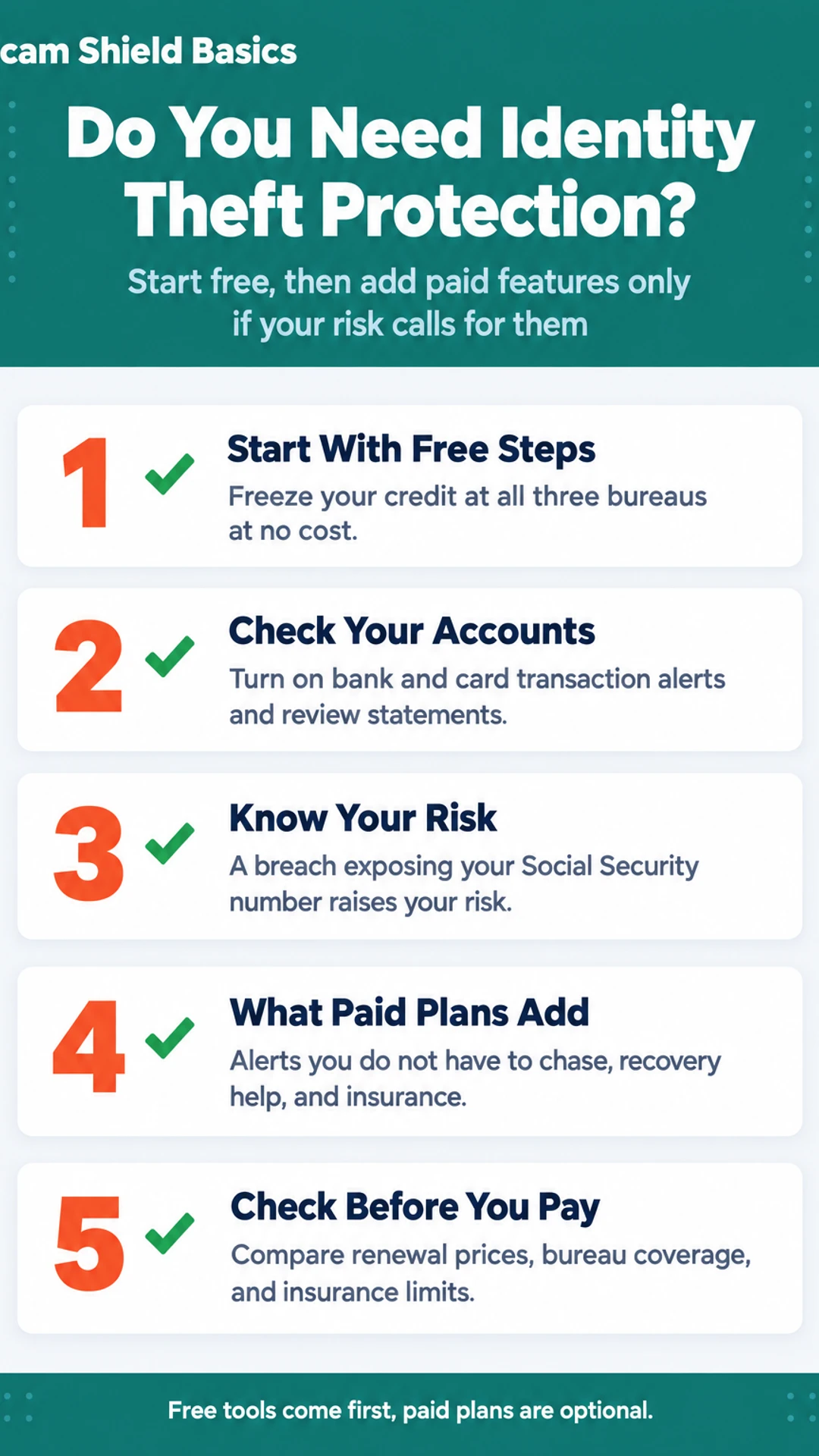
Before you pay for anything, check what you can get for free. Most of the core protection that paid services advertise is available without a subscription. The real question is whether a paid plan adds something you cannot get yourself.
Can a credit freeze stop someone from opening accounts in my name?
In most cases, yes. A credit freeze locks your credit file so lenders and new creditors cannot pull it. Without a report to look at, most banks and card issuers will not approve a new account. You can freeze your file with each of the three bureaus: Equifax, Experian and TransUnion. Under federal law, each freeze is free. You can lift it temporarily when you need to apply for credit, then put it back on.
Freezing with all three bureaus is the step that matters most for new-account fraud. Freezing with just one leaves the other two open.
What do free credit reports and fraud alerts add?
You can request your reports at annualcreditreport.com, the official site for free reports. Federal rules let you get them from each bureau, so you can check for accounts you do not recognize. A fraud alert is also free. It asks lenders to verify your identity before extending new credit, and it lasts for a set period, so you may need to renew it.
How do I catch everyday fraud?
Check your bank and card accounts directly. Most unauthorized charges show up there first, and most banks let you turn on transaction alerts by text or app notification at no cost. Reviewing statements regularly and reporting anything odd quickly covers a large share of everyday fraud. In my own routine, this is the first thing I set up and the thing I check most often.
Risk Factors That Change the Answer
Whether identity theft protection is worth paying for depends mostly on your situation. Run through these four cases and see which one sounds like you.
Your Social Security number was in a data breach. This is the highest-risk case. A Social Security number is hard to change, and it is the piece thieves most want for opening new credit in your name. If you got a breach notice that included it, a paid service with credit monitoring and alerts is worth considering, along with a credit freeze.
You have already had a scam or fraud attempt. Someone tried to use your information once, and they may try again. Ongoing alerts can help you catch repeat attempts quickly, which is the main reason people in this group pay for monitoring.
You are protecting someone else too. A child's identity, a deceased relative's accounts, or your own damaged credit history can each justify a second layer. In these situations a paid service can handle paperwork with banks and bureaus, which takes real time to do alone.
Your risk is low. If none of the above applies, a credit freeze at each of the three bureaus and a habit of checking your statements is usually enough. Free credit reports cover much of what a basic plan offers.
If you are unsure, begin with the free steps. You can add a paid service later if your situation changes.
Paid Features Compared With Free Options
Free tools cover a lot, but they do not do everything. The main gaps are alerts that reach you without you asking, and someone to help with the paperwork when something goes wrong.
Free credit freezes and free credit reports are real protection. A freeze stops most new accounts from being opened in your name. A report lets you check what is on your file. Neither one sends you an alert on its own, and neither one watches the dark web for your data. If you want to know whether your Social Security number or email has appeared in a leak, a paid service is one way to find out without checking by hand.
What paid plans add
- Alerts you do not have to chase. Dark web monitoring and new account alerts arrive by email or text.
- Recovery help. This is the main practical value. Someone helps you sort out bank and credit bureau paperwork after a theft, which can take many hours on your own.
- Insurance. Check what it actually reimburses, under what conditions, and whether it is a real reimbursement policy or just legal-expense cover. The two are not the same.
What to check before you pay
In Finance Pulse's walkthrough, the reviewer noted that LifeLock's freezes tab links you to each bureau's own site rather than placing the freeze for you. The freeze still has to be completed at each bureau. Ask yourself whether you are paying for the freeze itself or for the convenience of having the links in one place.
Free tools compared with paid features
| Option | Stops new accounts | Sends alerts on its own |
|---|---|---|
| Credit freeze | Yes, in most cases | No |
| Free credit reports | No | No |
| Paid monitoring | No, reports after the fact | Yes |
Cost, Renewal and Questions to Ask Before Paying
Most identity theft protection services look affordable on the first page. The real cost often shows up later, so check it before you sign up.
Start with the renewal price, not the introductory price. Many services charge a lower rate for the first year and a higher rate after that. Find the renewal figure in the terms or on the checkout page, and write it down.
Next, check what the tier actually includes. In The Opt Out Project's review, LifeLock Core at $12.49 a month monitored only two of the three credit bureaus. Three-bureau monitoring required the Advanced tier at $19.99 a month. Prices change, so confirm the current figures on the company's own site before you decide.
The Tech Roost's reviewer made a similar point. They said premium-tier three-bureau monitoring costs two to three times more than comparable options, and that Aura had no tiers and cost significantly less. Compare the price of the feature you actually need, not the headline plan.
What happens if you cancel?
Ask this before you pay, not after. In Finance Pulse's walkthrough, the reviewer noted that cancelling LifeLock switches off its credit lock, while a legal freeze you placed yourself stays in place. Find out what you lose on the day you cancel, and whether any alerts, insurance or data removal stop with it.
Questions to ask before paying
- What is the renewal price, and when does it start?
- Which credit bureaus does the plan I am choosing monitor?
- Does the credit lock cover all three bureaus, or only one?
- What happens to locks, alerts and coverage if I cancel?
- Are any insurance reimbursement limits and their conditions written in the policy?
A credit freeze at each bureau costs nothing and does not expire. If a paid plan does not add anything you need beyond that, you can skip it.
A Simple Way to Decide
Start with the free tools. Freezing your credit at the three bureaus, Equifax, Experian and TransUnion, costs nothing and blocks most new accounts from being opened in your name. You can also pull your free credit reports at AnnualCreditReport.com. Do both before you spend a dollar. They cover the core risk for most people.
Next, look at your own situation. Paying makes more sense when one of these applies to you:
- Your information was exposed in a breach and you want ongoing alerts you would not set up yourself.
- Someone has already misused your identity and you want help with paperwork for banks and bureaus.
- You want one subscription that bundles monitoring, alerts and insurance instead of managing separate tools.
If none of these fits, free tools are probably enough for now.
If you do pay, write a review date on your calendar a few weeks before renewal. Introductory rates often rise, and it is easy to forget a subscription you no longer use. Check each year what the plan covers and whether you still need it.
Remember that monitoring reports events after they happen. It does not stop them. Keep reading your bank and card statements, and check your credit reports on a regular schedule either way.
What hands-on reviewers found
These are other people's hands-on tests, summarised and credited to them. Watch the full videos for their complete reviews.
The Opt Out Project: Lifelock Review… Is LifeLock Worth It?
The reviewer concludes that LifeLock is a real but overpriced product that gates key features behind higher tiers, and thinks Aura offers better coverage and value for buyers starting from scratch.
- The team signed up for LifeLock and competing services, used them over months or years, ran credit checks, tracked dark web alerts, and called customer support. (at 1:00)
- LifeLock Core, at $12.49 a month, monitors only two of the three credit bureaus, and three-bureau monitoring requires upgrading to Advanced at $19.99 a month. (at 2:10)
- In a head-to-head test on the same identity, a competing service surfaced more dark web alerts than LifeLock and caught leaked Gmail credentials LifeLock never showed. (at 4:00)
Consumer Research Studios: LifeLock Review | Costs and Features: Is It Worth It?
The reviewer thinks LifeLock is a solid identity protection option best suited to people who want a full support system with high coverage limits, though it is an early warning system rather than a way to prevent identity theft.
- The reviewer says the stolen wallet protection feature is a highlight, since LifeLock helps cancel and replace cards and ID immediately if belongings go missing. (at 1:00)
- The reviewer says the address change verification alert is useful because it catches mail being rerouted without the user's knowledge, a common identity theft tactic. (at 1:32)
- The reviewer says the notifications can be a little heavy at times but would rather deal with extra alerts than miss something important. (at 2:46)
Frequently asked questions
How serious is identity theft?
Identity theft can be serious and slow to fix. A thief can open accounts, file taxes in your name, or take out loans using your Social Security number and other details. Cleaning it up often means calling banks, the credit bureaus, and sometimes the IRS or police. Catching it early limits the damage, which is the main reason people look at monitoring.
Is Medical Shield legit?
I have not tested Medical Shield, so I can't tell you whether it is legitimate. Before you pay for any medical or identity product, check who the company is, read its terms for what it covers and excludes, and look for independent reviews from people who used it. Confirm the claims in writing rather than relying on a sales call.
How to protect kids from identity theft?
The most useful step is to freeze your child's credit, which blocks new accounts in their name. Many parents don't realize children can be targeted, and a thief may use a child's clean record for years. Keep their Social Security number private, ask schools and doctors why they need it, and check whether a credit file already exists for them.
What can LifeLock do for you?
LifeLock offers identity monitoring, alerts when your personal information shows up in certain places, and help with recovering from identity theft. Its plans differ in what they include, so check which tier covers the bureaus and features you need. Free credit freezes and free credit reports from the bureaus can already do some of the same things.
Is identity theft protection worth it?
It depends on your situation. If you've had a data breach notice, a scam, or fraud already, ongoing monitoring may be worth paying for. If you mainly want to avoid new accounts being opened, a credit freeze often does that job at no cost. Compare what a paid plan adds against what you can do yourself before you subscribe.
Wrapping up
Paid identity protection is worth it only when it adds something you can't easily do yourself. Start with credit freezes and free credit reports, then decide whether monitoring or recovery help is worth a monthly fee for your risk. Have you paid for identity protection before, and did it feel worth the cost? Tell us in the comments.