Is LifeLock Worth It? What It Covers, What Free Tools Do, and Which Plan Fits
The short answer
LifeLock is a paid identity theft protection service. It watches your credit and personal data, sends alerts, and offers help and sometimes insurance if your identity is stolen. Much of the core protection is free: you can freeze your credit at each bureau, place fraud alerts, and check your credit reports for free. A paid plan is worth considering if you want ongoing alerts you do not have to set up yourself, help with recovery paperwork, or a specific feature you need. Check renewal prices before you buy.
Some links on this site are affiliate links: if you buy through one, the site may earn a commission at no extra cost to you. More about this.
- Where the free tools stop: what a credit freeze and fraud alert do, and what they cannot see.
- What LifeLock adds: the alerts, monitoring, and recovery help you would otherwise handle yourself.
- The gaps to check: which credit bureaus are covered and what the lower tiers leave out.
- Cost and renewal: why the first-year price is not the number to compare.
- Matching a plan to your risk: a breach notice, a past scam, or a stolen wallet each call for different protection.
- How the picks were chosen: how we compared LifeLock with free options and alternatives.
If you have ever opened a data breach letter and wondered whether your Social Security number was in it, you are not alone. The worry is reasonable. The question is what you should do about it, and whether paying a monthly fee actually buys you anything the free tools cannot. Those are fair things to want to settle before you hand over a card number.
This page will give you a straight answer. We compare LifeLock against free options and other paid services at a glance, then explain what each type of protection does and where it falls short. You will see how to match a plan to the specific risk you face, whether that is a breach, a past scam, or a worry about new accounts opened in your name. We also say plainly how the options were chosen, and what we have and have not checked ourselves.
LifeLock and the free alternatives at a glance
| Option | Best for | Bureau coverage | Key feature | Price as stated |
|---|---|---|---|---|
| LifeLock Core | Basic alerts on a budget | Two of three bureaus | Entry-level monitoring tier | Not stated |
| LifeLock higher tiers | Full three-bureau monitoring | All three bureaus | Three-bureau monitoring | Not stated |
| LifeLock family plan | Several adults and children | Not stated | Covers multiple people | Not stated |
| Free credit freeze | Blocking new accounts | All three bureaus | Stops most new credit checks | Free |
| Free fraud alert | Extra identity checks by lenders | Not stated | Renewable verification request | Free |
| Self-directed recovery | Handling theft without a paid service | Not stated | FTC plan at IdentityTheft.gov | Free |
Guides on this site
What LifeLock Actually Does
LifeLock is a subscription service. It watches for signs that your personal information is being misused, and it offers help if someone steals your identity. Before you pay, it helps to know what each piece does in practice.
How does the credit monitoring work?
Credit monitoring checks your credit file at one or more of the three major credit bureaus (Equifax, Experian and TransUnion). When a new account, a credit inquiry or a change shows up, you get an alert. The key detail is which bureaus a plan covers. In the Finance Pulse review, the reviewer noted that the credit lock on that plan covers only TransUnion. In the Opt Out Project's testing, the entry tier, LifeLock Core, monitors only two of the three bureaus, and full three-bureau monitoring sits on a higher tier. Companies gate it there because it is the more complete and more expensive service to run. Check the tier you are looking at before you assume you are covered at all three.
What do dark web and account alerts tell you?
These alerts tell you when your data, such as an email address, password or card number, appears in places where stolen information is traded. They also flag activity on some linked accounts. An alert is useful because it tells you early that something has leaked, so you can change passwords or call your bank. It is not a shield.
What does identity restoration cover?
If someone opens accounts in your name, a restoration specialist can help you deal with the paperwork. That means contacting banks, creditors and bureaus to dispute the accounts. Ask what the restoration help does and does not include, and whether any reimbursement has limits or conditions.
What the Alerts Cannot Do
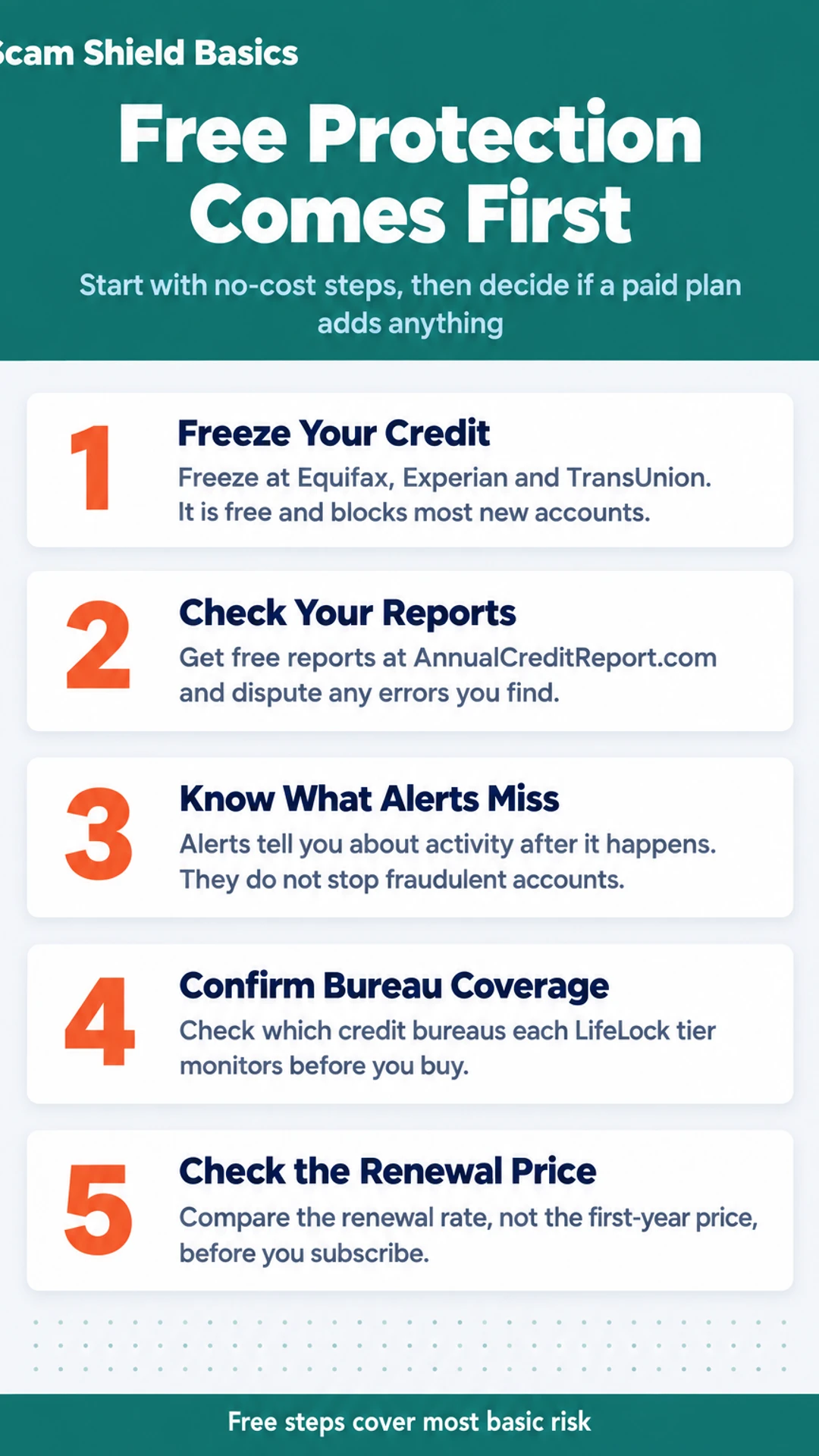
This is the most important point. Alerts tell you about activity. They do not stop a fraudulent account on their own. If a thief opens a loan in your name, you will hear about it after it happens. To block new accounts, you need a credit freeze, which is free and is placed directly with each bureau.
What Free Tools Already Cover
Before you pay for anything, it helps to know what you can get at no cost. A lot of the basic protection that paid services advertise is available to you directly, and the gap between free tools and a paid plan is smaller than the marketing suggests.
Can a credit freeze stop someone from opening credit in my name?
Yes, in most cases. A credit freeze locks your credit file at Equifax, Experian and TransUnion, so a lender usually cannot check it before approving a new account. You can place or lift a freeze at each bureau's website, and it costs nothing. Freezing all three is the most complete option. Lenders that have not been given a way to see your file often decline the application.
What do fraud alerts and free credit reports show?
A fraud alert asks businesses to take extra steps to verify your identity before extending credit. It lasts for a set period and you can renew it. You can also get a free credit report from each bureau through AnnualCreditReport.com. Read each one for accounts you do not recognize, addresses you have never lived at, and late payments or inquiries you did not make. Errors are common, and you can dispute them directly with the bureau.
What steps can I take myself if my identity is stolen?
A paid service often walks you through recovery. You can do most of the same steps yourself:
- Report the theft to the Federal Trade Commission at IdentityTheft.gov, which creates a recovery plan.
- Contact each bank or card issuer where fraud occurred and ask them to close or freeze the account.
- Place an extended fraud alert or a freeze with the bureaus.
- File a police report if the FTC plan or a creditor asks for one.
The paid plan's real advantage is someone handling the paperwork for you, not access to information you cannot otherwise get.
Matching a Plan to Your Risk
The right level of protection depends on what has already happened or what you are worried about. Start there before you look at any plan's features.
I got a data breach notice. What should I do?
Start with free steps. Freeze your credit at each of the three bureaus (Equifax, Experian and TransUnion). A freeze is free and blocks most new accounts from being opened in your name. Then change the passwords on the affected account and anywhere else you reused that password. Turn on two-factor authentication where you can.
Only after that should you ask whether monitoring adds anything. If your Social Security number was exposed, ongoing monitoring may give you a bit more visibility. If only an email address or password was leaked, the free steps usually cover most of the risk.
I was targeted by a scam or someone tried to use my information
Report it first, to the FTC at IdentityTheft.gov and to your bank or card issuer. Then watch your statements closely for the next few months. Read every line, not just the total.
Consider alerts if the attempt involved your Social Security number, bank details or other personal data. Alerts can catch new activity sooner than you would notice on your own.
I want to protect my family or my child
A family plan covers several people under one subscription. Individual plans cover one adult. Check exactly who is included and whether children are covered at all, since plan terms differ.
Children's credit is handled differently. A child usually has no credit file, so the useful step is a freeze on that file, which you can request for a minor at each bureau. Ask whether a plan monitors a child's identity or only an adult's.
What It Costs, Now and at Renewal
Prices for LifeLock change, so treat any number you read here as a starting point, not a quote. The figures below are the published monthly prices as of the date this page was checked, and you should confirm them on the LifeLock site before you pay. The date checked is noted in the section where the plans are compared.
Published monthly prices (individual and family tiers):
- Individual plans start at a lower monthly rate and rise as you add features.
- Family plans cost more per month but cover several adults and children under one account.
- Each tier name, such as Standard, Advanced, or Ultimate, is a bundle of features. Read what each one includes, not just the name.
Why does the first year look cheaper than it will be?
Many identity protection services advertise a low introductory rate. The rate you pay after that first term is the renewal rate, and it is often higher. A low first-year price is not a reason to buy on its own.
Before you pay, find the renewal terms:
- Go to the plan page and look for the fine print under the price, not the large number.
- Look for the words "renews at" or "then," followed by a monthly or annual amount.
- Check the order confirmation email for the renewal date and amount.
- Note the cancellation steps so you know how to stop the charge before it starts.
Do you need a higher tier for the features you want?
Start with the features you need. Do you want credit monitoring from all three bureaus, or only one? Do you want help restoring your identity if it is stolen? Do you want coverage for more than one person?
If a feature you care about sits only in a higher tier, the cheaper plan will not cover it. If you only want alerts, a lower tier may be enough. Compare the feature list against your own situation before you pick a level.
What Hands-On Reviewers Found
Video reviews are a useful check on marketing claims, but each reviewer tested different plans and ran different tests. Here is what three of them reported, including the weak points.
Is the setup hard, and does the data removal work?
In Finance Pulse's walkthrough, the reviewer said the full setup took about 20 minutes, covering plan selection, signup, credit locking, alerts and monitoring. They valued the automated data broker removal, which runs on its own and repeats every 90 days. That is the feature they said kept them subscribed.
The weak points they raised were specific:
- The credit lock covers only TransUnion, not all three bureaus.
- Cancelling the subscription switches the lock off. A legal freeze would stay in place, but you should know this before you leave.
Are the alerts fast enough?
In The Tech Roost's review, the reviewer said alerts were slower than some competitors in their testing. Three-bureau monitoring also sits behind the higher tiers, which they called a drawback. They also said LifeLock's dark web alerts came in lower in volume than the top pick in their testing.
Does the cheaper plan cover enough?
In The Opt Out Project's review, the tester said LifeLock Core covers two of the three bureaus. In a head-to-head test on the same identity, a competing service surfaced more dark web alerts than LifeLock and caught leaked Gmail credentials that LifeLock never showed.
If you are weighing a plan, these findings point to one question: which bureaus and alert types matter most for your situation? That is worth settling before you compare prices.
How to Decide, and When Free Is Enough
Start with the free steps. They cost nothing, and they cover a lot of the risk most families actually face.
Check your credit reports. You can get free reports from each of the three bureaus, Equifax, Experian and TransUnion, at AnnualCreditReport.com. Look for accounts you did not open.
Freeze your credit. A credit freeze stops new accounts from being opened in your name. It is free at each bureau, and you can lift it when you need to apply for credit yourself.
Turn on alerts from your bank and card issuer. Most will text you on every purchase or large transaction, and that catches card misuse quickly.
Change passwords on your email and main accounts, and turn on two-factor authentication.
If those steps cover your situation, you may not need a paid plan at all. Pay for one only when you can name a specific gap. For example, you want someone to help you sort out paperwork after your identity is stolen, or you want dark web monitoring because a breach exposed your Social Security number.
What should you check before you sign up?
Read the cancellation terms first. Find out how to cancel, whether you can do it online, and whether cancelling turns off features like a credit lock. Then look up the renewal price, because the first-year rate is often lower than what you pay after.
Put the renewal date on your calendar as soon as you sign up. That way you decide whether to keep the plan, rather than finding out from a charge.
Where do you go next?
For detail on each question, see the LifeLock cost, customer service and Aura comparison pages in this hub. Our guide to free credit freezes and fraud alerts explains those tools in full, and the risk-based guide helps you match a plan to your situation.
What hands-on reviewers found
These are other people's hands-on tests, summarised and credited to them. Watch the full videos for their complete reviews.
Finance Pulse: LifeLock Tutorial 2026: Full Setup Walkthrough & Honest Review 🛡️
The reviewer thinks LifeLock is worth paying for mainly for its automated data broker removal and alerts, while noting it has real gaps: the credit lock covers only TransUnion, Core lacks scam coverage, and cancelling does not lift the lock
- The whole LifeLock setup took about 20 minutes, covering plan selection, signup, credit locking, alerts and monitoring. (at 0:18)
- Connecting a bank account through Plaid took about 30 seconds per account, and the reviewer says it needs no further attention afterward. (at 1:36)
- The reviewer says the credit lock and payday loan lock can be toggled from a phone, which matters when someone is at a car dealership. (at 2:45)
- Privacy monitor data broker removal runs automatically and repeats every 90 days, which the reviewer says is why they keep the subscription active. (at 4:05)
The Tech Roost: Lifelock Review - Here’s Who It’s Actually For
The reviewer thinks LifeLock is a legitimate product but suited only to a specific buyer who wants the Norton name, antivirus and VPN and will pay more for them, and considers Aura the better fit for most people.
- Compared to the rest of the category, LifeLock has real strengths: brand recognition, a strong VPN, and antivirus from the Norton ecosystem that does not slow the computer down. (at 0:34)
- In side-by-side testing that simulated a credit check or major purchase, LifeLock consistently came in last on alert speed, with the reviewer citing 2 to 3 minute alerts for modest services. (at 2:59)
- During the reviewer's first on-camera LifeLock signup call about a hypothetical problem, the representative would not let them hang up before pitching a coverage upgrade. (at 4:20)
- The reviewer objects to gating full three-bureau credit monitoring behind higher LifeLock tiers, and says premium-tier coverage costs two to three times more than comparable options. (at 4:52)
The Opt Out Project: Lifelock Review… Is LifeLock Worth It?
The reviewer concludes that LifeLock is a real but overpriced product that gates key features behind higher tiers, and thinks Aura offers better coverage and value for buyers starting from scratch.
- The team signed up for LifeLock and competing services, used them over months or years, ran credit checks, tracked dark web alerts, and called customer support. (at 1:00)
- LifeLock Core, at $12.49 a month, monitors only two of the three credit bureaus, and three-bureau monitoring requires upgrading to Advanced at $19.99 a month. (at 2:10)
- In a head-to-head test on the same identity, a competing service surfaced more dark web alerts than LifeLock and caught leaked Gmail credentials LifeLock never showed. (at 4:00)
- In one test, LifeLock's standard dashboard found 13 leaked-information instances in the initial scan and three more alerts over 12 months, 16 in total. (at 4:20)
Consumer Research Studios: LifeLock Review | Costs and Features: Is It Worth It?
The reviewer thinks LifeLock is a solid identity protection option best suited to people who want a full support system with high coverage limits, though it is an early warning system rather than a way to prevent identity theft.
- The reviewer says the stolen wallet protection feature is a highlight, since LifeLock helps cancel and replace cards and ID immediately if belongings go missing. (at 1:00)
- The reviewer says the address change verification alert is useful because it catches mail being rerouted without the user's knowledge, a common identity theft tactic. (at 1:32)
- The reviewer says the notifications can be a little heavy at times but would rather deal with extra alerts than miss something important. (at 2:46)
- The reviewer says LifeLock's top tier plan offers up to $3 million in total protection per person, with no cap on the number of claims that can be filed. (at 3:52)
Frequently asked questions
What is the price of a Norton 360 with LifeLock Ultimate Plus subscription?
Pricing for Norton 360 with LifeLock Ultimate Plus changes over time and often differs between the first year and renewal. The exact current figure is listed on the official Norton site, so check there before you buy. Compare the renewal price, not only the first-year offer, since the two can be quite different.
Is LifeLock 24 hour customer service phone number?
LifeLock advertises support, but I have not confirmed a specific 24-hour phone line, so I won't give you a number to call. The number is listed in your account or on the official Norton LifeLock support page. Save it once you have it, and verify it there rather than trusting a number from a search result or an unsolicited message.
How do I cancel my NortonLifeLock subscription?
Cancellation is usually handled through your Norton account, under subscription or billing settings. Confirm the cancellation is complete and note whether you will keep any alerts or locks. In one hands-on review, cancelling switched off the credit lock while a legal freeze would stay in place, so check which protections end when you cancel.
What are people saying about LifeLock in their reviews?
Reviews are mixed. Several video reviewers say the automated data broker removal and alerts are the main reason to pay, while others find the credit monitoring limited to fewer bureaus, the upgrade pitches frequent, and the price high for what is included. Read a few independent reviews and weigh them against what you personally need protected.
Can free tools do what LifeLock does?
Some of it, yes. Free credit freezes at each bureau and free credit reports cover much of the basic risk of new accounts being opened in your name. A paid service adds ongoing alerts, data removal, and help with paperwork. Whether that extra is worth the cost depends on your situation, which is what the rest of this guide helps you work through.
Wrapping up
For most people, free credit freezes and free credit reports cover the core risk of someone opening accounts in your name. A paid plan like LifeLock mainly adds ongoing alerts, data broker removal, and help with recovery, so it makes sense only if those extras match a real worry for you.
If you have already had a scam or a data breach, that is the moment to look closer at paid options. What made you start looking into this? Tell us in the comments.