LifelockIs LifeLock Worth It? How to Decide for Your Situation
Is LifeLock Worth It? How to Decide for Your Situation
The short answer
LifeLock can be worth it if you want one subscription that combines credit monitoring, alerts, and recovery help, and you are willing to pay for tiers that include the bureau coverage you need. For many people, free credit freezes and free credit reports already cover the main risks. Paying adds the most value when you want ongoing alerts, hands-on help with recovery paperwork, or insurance. Check the tier, the renewal price, and what it does not cover before you buy.
Some links on this site are affiliate links: if you buy through one, the site may earn a commission at no extra cost to you. More about this.
Here is what this guide covers:
- Your risk, not the sales pitch: how a data breach notice, a past scam, or a new credit worry changes the answer.
- What free tools already do: what credit freezes, fraud alerts, and free credit reports handle without a subscription.
- Where paid plans add something: alerts, recovery help, and insurance, and how much of each you actually get.
- The catches: bureau coverage by tier, renewal pricing, and what the plan leaves out.
- How to decide: a simple way to match your situation to a plan or to skip paying altogether.
If you have just received a data breach notice, you are probably wondering whether your Social Security number or card details are now exposed. That worry is reasonable, and it is the most common reason people look at this product. You want to know whether paying will lower the risk or just make you feel better.
This page gives you a way to answer that for your own case. I will walk through the risks that usually bring people to LifeLock, show what you can do for free, and point out where a paid plan earns its fee. I am sharing how I think about this, and where other people's hands-on tests support a point, I will say whose test it is.
I chose the points below by asking what a reader in your position needs to settle before paying: what is free, what is paid, and what is not covered. I did not pick them based on which product sounds the most impressive.
Start With Why You Are Asking
The right answer depends on what made you look in the first place. A product that helps one person can be wasted money for another, so start with your trigger.
If you got a data breach notice
Your main worry is that your Social Security number, email, or card details are now out there. The first steps are free. You can freeze your credit at each of the three bureaus at no cost, place a fraud alert, check your reports, and change any passwords that were exposed. Do those first. A paid plan adds ongoing alerts, but it does not protect you from the breach itself.
If you were already scammed or someone tried to commit fraud
Here, ongoing monitoring is the main thing a paid service can add. You want to know quickly if your information shows up somewhere new or if someone opens an account in your name. Paying can make sense if you want that watching done for you and you will act on the alerts. Be honest about whether you will.
If you have a new credit concern or suspect identity misuse
Recovery help and bureau-level alerts matter more than anything else. If a bank or collector is chasing a debt that is not yours, you need someone who can work through the paperwork with banks and the bureaus. Check whether a plan includes that help and what it actually covers before you pay.
If you want one subscription instead of several free tools
This is a convenience question. Free tools can do most of the core work, but they mean you manage each one yourself. Weigh the time you would save against the monthly cost over a full year, not just the first-year offer. Ask how the renewal price compares.
What Free Steps Already Do
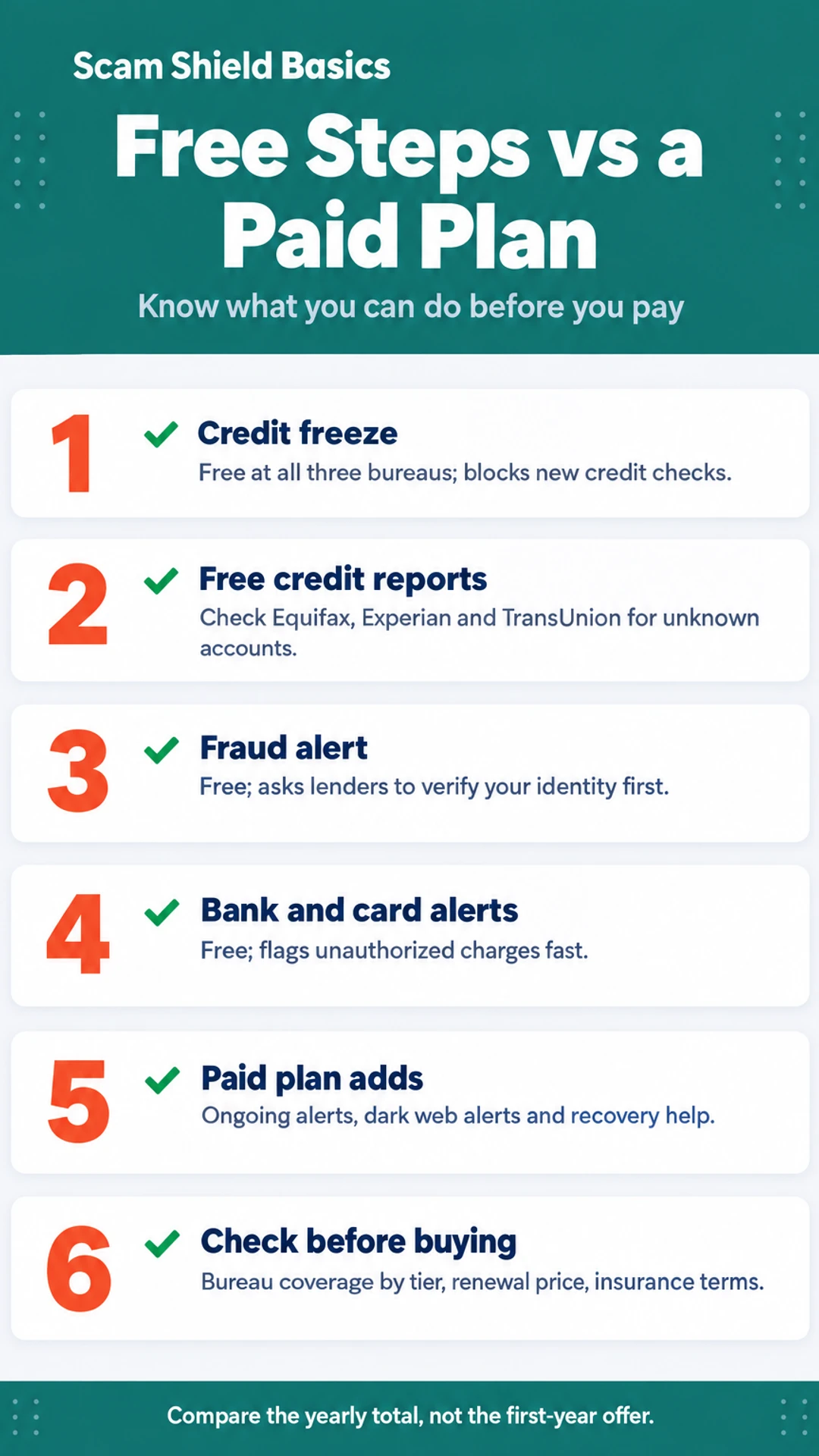
Before you pay for anything, know what you can do for free. A lot of the core protection people buy is available at no cost, though it takes some effort to set up and keep up.
The most useful free step is a credit freeze. You place one with each of the three bureaus: Equifax, Experian and TransUnion. A freeze blocks new credit checks, which makes it much harder for someone to open a loan or card in your name. Freezes are free, and you can lift one when you need to apply for credit yourself.
Next, look at your credit reports. You can get free reports from each bureau through AnnualCreditReport.com. Check them for accounts or inquiries you do not recognize.
You can also place a fraud alert, which asks lenders to verify your identity before opening new credit. It is free and lasts for a set period.
Finally, turn on notifications with your own bank and card companies. Many send a text or push message for every transaction, so you can spot an unauthorized charge quickly.
What free steps do not do
Free tools have limits. They do not watch dark web sites for your data. They do not handle recovery paperwork with banks and bureaus if your identity is stolen. That work falls to you, and it can take time.
Free steps versus a paid plan
| Option | Pros | Cons |
|---|---|---|
| Free credit freezes | No cost, blocks new credit checks | You must lift them to apply for credit |
| Free credit reports | No cost, shows accounts you may not recognize | You check them yourself |
| Bank and card alerts | Free, flags unauthorized charges fast | Covers only that institution |
| Paid plan (LifeLock) | Ongoing alerts, dark web alerts, recovery help | Renewal pricing, bureau coverage varies by tier |
What LifeLock Covers and Where It Falls Short
Most LifeLock plans bundle three things: identity and credit monitoring, dark web alerts, and restoration help. Monitoring watches your credit file and sends you an alert when something changes, such as a new account opened in your name. Dark web alerts tell you when your personal information, like a Social Security number or email address, appears on sites where stolen data is traded. Restoration help means a specialist works through the paperwork with banks and the bureaus if your identity is actually taken.
Does the credit lock cover all three bureaus?
Not on the base plan. Reviewers have flagged that the credit lock covers only TransUnion, and that full three-bureau monitoring sits in higher tiers. If you want all three files watched, check which plan includes it before you pay.
Are dark web alerts a full picture of your exposure?
Reviewers say no. In one head-to-head test, a competing service surfaced more dark web alerts than LifeLock on the same identity and caught leaked email credentials LifeLock did not show. Dark web alerts are useful, but they only reflect what the service can find, so they are not a complete record of where your information has leaked.
Keep in mind that a free credit freeze at each bureau does something similar for new-account fraud, and you can set it up yourself.
Plans, Pricing and Renewal
Before you sign up, look at which tier you would actually be on. The cheaper plan and the more complete plan are not the same product. Check whether the tier you are considering includes three-bureau credit monitoring. Some reviewers have pointed out that LifeLock's lower tier watches only two of the three bureaus, and three-bureau monitoring sits on a higher tier. If you want all three covered, confirm that before you pay.
Next, read the renewal price. The first-year rate is often lower than what you pay after that. Find the renewal figure on the sign-up page or in the terms, and work out what you will pay in year two. A plan that looks cheap at signup can cost noticeably more the following year.
Reviewers have also said that premium tiers cost much more than comparable options. In one review, the reviewer put the premium-tier cost at two to three times what similar services charge. Compare the total yearly cost of the tier you need against other services, not just the headline monthly rate.
Finally, confirm exactly what the insurance covers and under what conditions. Look for the reimbursement limit, what counts as a covered loss, and any requirements you must meet to file a claim. Do not rely on a promised amount until you have read the actual terms.
Here is a short checklist to work through:
- Which tier includes the three bureaus you need?
- What is the renewal price, and when does it start?
- What does the yearly cost come to, compared with alternatives?
- What does the insurance cover, and what conditions apply?
LifeLock plan checks before you buy
| Check | What to confirm | Where to find it |
|---|---|---|
| Bureau coverage | Three bureaus or fewer | Plan details on sign-up page |
| Renewal price | Year two cost | Terms or sign-up page |
| Yearly total | Compared with alternatives | Your own calculation |
| Insurance terms | Limit and covered losses | Actual policy terms |
Matching the Decision to Your Situation
The right answer depends less on the product and more on why you are asking. Here are the common cases, so you can see where you fit.
Likely worth it: you want ongoing alerts, recovery help and one place to manage it
If you want a single account that watches your credit, sends alerts when your information shows up in unexpected places, and has someone help with the paperwork if your identity is stolen, a paid plan may suit you. Plenty of people would rather pay a monthly fee than piece together several free tools and keep track of them alone.
Probably not needed yet: you got a routine breach notice and have seen no misuse
A notice that your data was part of a breach is worrying, but it does not automatically mean you need a paid service. Many people in this spot do fine with free credit freezes, free credit reports and a close look at their bank and card statements. Revisit the question if you later see something odd.
Families and couples: check coverage, then compare cost per person
Before you buy, confirm whether the plan covers everyone you want to include. Some plans cover one adult, some add family members at a higher price, and some have limits on who counts. Divide the total cost by the number of people covered. A plan that looks cheap for one person can cost more per head than separate options for a household.
Anyone who has already been scammed: ask whether monitoring would have caught it
This is the question people skip. Many scams work because the victim approves a payment or sends money willingly, and a credit or identity alert may never fire in that case. Ask yourself whether the thing that hurt you would have shown up in a monitoring report. If it would not, the plan may not address your actual problem, and better habits or a bank-level fraud check may do more.
Before You Buy and How to Cancel
Before you pay for anything, check what the plan actually protects. Start with the credit bureaus. There are three: Equifax, Experian and TransUnion. Ask which ones the plan monitors, and whether the credit lock covers all three. In one hands-on review by Finance Pulse, the reviewer said the credit lock covers only TransUnion. That kind of gap matters if your concern is a new account opened in your name at a bureau the plan does not lock.
Next, know what cancelling does. In the same Finance Pulse review, the reviewer noted that cancelling switches the lock off, while a legal freeze you placed yourself stays in place. A free freeze at each bureau is one of the simplest protections you can get without a subscription, and it does not depend on any plan staying active.
Expect upgrade pitches. The Tech Roost reviewer described a signup call where the representative would not let them hang up before pitching a higher tier. The Opt Out Project team also reported being offered an upgrade during a support call. Decide your spending limit before you pick up the phone, and write it down if that helps you stick to it.
Keep a record of the details that tend to catch people out:
- The date you signed up
- Your renewal date, and the price after the first year
- Every confirmation email, including any promo terms
- The exact steps you took to cancel, and when
If a charge appears later, that record is what you will need.
What hands-on reviewers found
These are other people's hands-on tests, summarised and credited to them. Watch the full videos for their complete reviews.
Finance Pulse: LifeLock Tutorial 2026: Full Setup Walkthrough & Honest Review 🛡️
The reviewer thinks LifeLock is worth paying for mainly for its automated data broker removal and alerts, while noting it has real gaps: the credit lock covers only TransUnion, Core lacks scam coverage, and cancelling does not lift the lock
- The whole LifeLock setup took about 20 minutes, covering plan selection, signup, credit locking, alerts and monitoring. (at 0:18)
- Connecting a bank account through Plaid took about 30 seconds per account, and the reviewer says it needs no further attention afterward. (at 1:36)
- The reviewer says the credit lock and payday loan lock can be toggled from a phone, which matters when someone is at a car dealership. (at 2:45)
The Tech Roost: Lifelock Review - Here’s Who It’s Actually For
The reviewer thinks LifeLock is a legitimate product but suited only to a specific buyer who wants the Norton name, antivirus and VPN and will pay more for them, and considers Aura the better fit for most people.
- Compared to the rest of the category, LifeLock has real strengths: brand recognition, a strong VPN, and antivirus from the Norton ecosystem that does not slow the computer down. (at 0:34)
- In side-by-side testing that simulated a credit check or major purchase, LifeLock consistently came in last on alert speed, with the reviewer citing 2 to 3 minute alerts for modest services. (at 2:59)
- During the reviewer's first on-camera LifeLock signup call about a hypothetical problem, the representative would not let them hang up before pitching a coverage upgrade. (at 4:20)
Frequently asked questions
Is there a LifeLock 24 hour customer service phone number?
LifeLock offers phone support, and you can find the current support number on the company's official website, in your account, or on the contact page. Confirm the number and hours there before you rely on it, since contact details can change. When you call, have your account information ready so the representative can help you faster.
Which is the best identity theft protection service?
There is no single best service for everyone. The right choice depends on what you need most, such as three-bureau credit monitoring, dark web alerts, or help restoring your identity. Start by listing your specific risks, then compare what each service includes at each price tier. Read the plan details closely before you pay.
Does LifeLock have a family plan?
LifeLock offers plans that can cover more than one person, so a family plan may be available. Coverage limits, the number of people included, and the price differ between plans. Check the current plan options on the official site to confirm what covers each family member before you sign up.
Do you really need ID theft insurance?
Most people do not need identity theft insurance to protect themselves, because the main costs of identity theft are time and paperwork more than cash. Insurance typically covers certain expenses like lost wages or legal fees, under specific conditions. Read what the policy covers, its limits, and its exclusions before you count on it.
Is LifeLock worth it for someone who has had a data breach notice?
A data breach notice is one of the clearer reasons to consider paid monitoring, since it means your information may be exposed. Free tools like credit freezes and free credit reports already cover a lot of that risk. Paid monitoring adds alerts and help with recovery, so it is worth it only if you want those extras.
Wrapping up
A paid plan is worth it when it fills a gap you actually have, like a breach notice, a past scam, or a worry about new accounts in your name. If you have none of those, free credit freezes and free credit reports cover much of the same ground.
Before you decide, list your specific risk and compare what each plan includes. Which of these risks worries you most? Share your situation in the comments and I will tell you what I would check first.